


Telicall: Second Phone Number
3.761.00 Reviews
App Specs
- Version
- 2.0.2
- Updated On
- License
- Free
- Downloads
- 1,000,000+
- Developer
- Getverify LDA
- Categories
- Communication
- Platform
- Android
Screenshots
 Analysis by AppCompare
When I need to call someone abroad, I want the conversation to feel ordinary: open the app, reach the person, and focus on what they’re saying instead of worrying about the bill or how to connect. Telicall: Global Phone Calls is aimed at that particular gap in communication. It’s a free calling app from Getverify LDA, and its appeal is less about changing how people talk than about offering another route when an international call through a regular mobile plan is inconvenient.
A useful option when distance meets a phone plan
International calls can be a small but persistent source of friction. A relative may prefer a conventional phone call, a work contact may not use the same messaging service as you, or a trip may leave you relying on Wi-Fi rather than your usual carrier setup. In those moments, a dedicated calling app can be more practical than trying to persuade everyone to install the same chat platform.
That is the need Telicall: Global Phone Calls is designed to address. Its focus is international calling, so I’d consider it when the person I need to reach is more comfortable with a phone call than with a video chat or a stream of messages. The important distinction is that this kind of app is a calling route, not a replacement for every part of a mobile plan. I would keep my usual phone and messaging options available rather than expect one app to cover every communication situation.
What the calling experience asks of you
A good international call should let you settle into the conversation quickly. The practical test is not only whether a call connects, but whether both people can follow one another without repeatedly stopping to repair the conversation. I’d use Wi-Fi when I have a reliable connection and choose a quieter spot for calls where details matter. A stable environment is more useful than trying to multitask through a weak or busy connection.
There is also a social difference between calling and messaging. A message can wait; a call asks for attention from both people at once. That makes a calling app most useful when the conversation benefits from a quick back-and-forth: arranging a pickup, checking in with family, or talking through a complicated plan that would become confusing in a long text thread. For casual updates, a message may still be kinder to someone’s schedule.
Cost and the habit of checking first
Telicall is free to download, but the app includes in-app purchases, with items ranging from $4.99 to $249.99. I would check the price and what a purchase covers before placing a long call, rather than assuming that installing a free app means every call is free. That is a simple habit, but it prevents a misunderstanding at exactly the moment you want to be focused on the person at the other end.
Its average rating is 4.1 from 123 ratings, and it has more than 100,000 installs. Those figures suggest that people are trying it, but they are not a substitute for deciding whether its calling approach suits your own routine. The app is rated for Everyone, runs on Android 8.0 or later, and version 1.3.0 is the current release. If your device is older, check compatibility before building the app into a travel or family-contact plan.
Worth Reading Before You Choose

EA SPORTS FC Mobile 26 Is a Bigger Football Game, but It Takes Time

Flipboard Shows What News Apps Must Do Beyond the Feed

Switching to Android Auto Means Rethinking Your Driving Routine

Google Calendar Makes a Crowded Week Easier to Manage

Ludo King Makes the Most of the Minutes Between Plans

Baby Panda World Brings Quick Play to Modern Phones, but Its Game Library Feels Busy
Boundaries matter as much as connection
Because calls are immediate, I’d treat availability as a choice rather than an obligation. Before calling someone in another time zone, consider whether a short message asking when they’re free would be more considerate. If you’re the person receiving calls, you can also decide when you want to answer and when a message is enough. A tool that makes reaching people easier does not remove the need to respect their time.
I’d also be careful about using any calling app for sensitive conversations until I had reviewed its current privacy information and understood the choices it offers. That is not a reason to avoid international calling; it is a sensible boundary for any app that carries personal conversations. For routine catch-ups, convenience may be the priority. For confidential work or particularly private matters, I would first consider whether the app and the other person’s setup meet the requirements of that conversation.
Who Telicall suits—and when another option makes more sense
I’d recommend considering Telicall if you regularly need to reach people in other countries and want a calling-focused option alongside your normal phone service. It may be especially useful when the other person expects a call rather than a video meeting, or when you do not want the whole conversation to depend on both people using one messaging app. Getverify LDA develops the app, which sits in the communication category and keeps its purpose easy to understand.
Choose the channel that fits the conversation
Compared with ordinary carrier calling, an app can be a useful alternative when international rates or plan terms make a direct call less appealing. Compared with internet messaging services, a calling-focused tool may suit someone who prefers a familiar voice conversation and does not want to turn a simple check-in into a video session. Each route has a trade-off: carrier calls rely on your plan, messaging services often work best when both people use the same service, and app-based calls depend on a suitable internet connection and the app’s own purchase terms.
For example, imagine I’m travelling and need to call a family member to confirm a change to our meeting place. I’d first make sure I have a dependable connection, check any applicable calling cost, and then call when they can give the conversation their attention. If the connection is poor, I’d switch to a short message and try again later instead of repeating the same failed call. That small fallback plan is more useful than assuming any single calling method will work everywhere.
Small routines that make calls easier
One practical tip is to decide in advance what a call is for. If I only need to confirm a time, I can keep the call brief; if I need to explain several details, I can move somewhere quiet and avoid splitting my attention. This is not a special feature of the app, but it makes any international call clearer and reduces the chance that one person has to repeat important information.
Another useful habit is to keep a backup channel ready. Before travelling, I’d make sure I can still reach key people through ordinary messaging or another calling option if Wi-Fi is unavailable or a call does not connect. I would not rely on one app as my only route to family, colleagues, or urgent contacts. A backup is especially worthwhile when plans depend on reaching someone at a particular time.
There is a trade-off in keeping a dedicated calling app: it gives you another way to place a call, but it also means checking another app’s costs, compatibility, and connection requirements. If most of your international conversations already happen comfortably through a messaging service or your carrier plan, adding another option may not simplify your life. If you only need occasional calls, compare the likely cost and convenience before buying anything in the app.
A measured recommendation
The app is free, but the range of in-app purchase prices makes it worth understanding what you are buying before relying on it for frequent calls. I would not treat a large purchase as automatically better value; first think about how often you call, whether those calls are long, and whether your existing alternatives already cover the need. For someone who makes regular international calls, that comparison is more useful than focusing on the download price alone.
Telicall is not the right choice for someone who needs guaranteed access regardless of internet conditions, wants every conversation to remain in one familiar messaging service, or rarely calls internationally. A standard carrier call may be simpler when the plan already covers the destination, while a message can be better when the recipient is busy or the information is not urgent. I see its value in having an additional route available, not in replacing the judgment involved in choosing when and how to contact someone.
If you’re deciding whether to try it, the useful questions are straightforward: does your device meet the Android requirement, do you have reliable internet where you expect to call, and have you checked the in-app purchase terms that apply to your use? If the answers fit, Telicall is a reasonable app to consider for international voice calls. I’d use it deliberately, keep a backup way to reach important people, and let the needs of the conversation—not the availability of a call button—set the pace.
If you've ever been frustrated with the limitations of your current phone plan, you're not alone. We all know how annoying it can be to deal with expensive international call rates and the lack of flexibility. That's where Telicall: Global Phone Calls comes in. This app is like a breath of fresh air, offering a seamless way to make international calls without breaking the bank. Let’s dive into what makes this app tick.
First Impressions and User Interface
When I first launched Telicall: Global Phone Calls, I was greeted with a clean and intuitive interface. The developers have done a fantastic job of keeping things straightforward. You won't find any unnecessary clutter here; everything is designed with user experience in mind. The main screen gives you quick access to your call history, contacts, and settings, making navigation a breeze.
The app's design is modern and sleek, with a color palette that's easy on the eyes. It's clear that a lot of thought went into making sure users can navigate without any hassle. If you're like me and value simplicity, you'll appreciate how user-friendly this app is.
Calling Features
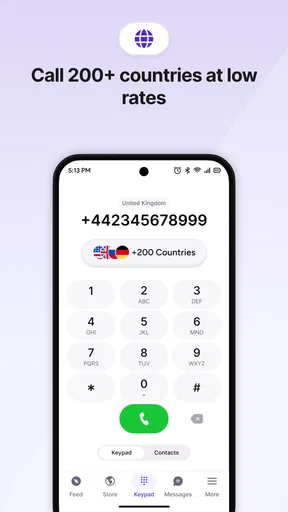
Now, let's talk about what really matters—the calling features. Telicall offers high-quality voice calls to over 200 countries. I tested it out by calling a friend in Spain, and the call quality was crystal clear, with no noticeable lag or connection issues. It's as if we were in the same room.
One standout feature is the app's ability to connect calls using either Wi-Fi or cellular data. This flexibility is perfect for travelers or anyone who frequently switches between networks. Plus, the app automatically chooses the best connection available, so you don't have to worry about manually switching settings.
Cost-Effectiveness
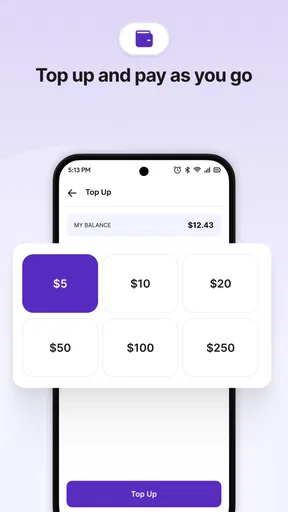
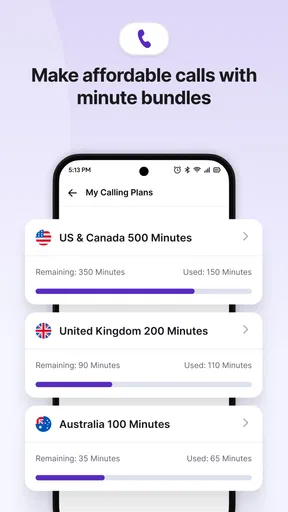
Let's be real—nobody likes spending a fortune on phone calls. Telicall offers a variety of affordable plans that cater to different needs. Whether you're a frequent traveler or just need to make the occasional international call, there's an option for you. They even offer pay-as-you-go credits for those who prefer not to commit to a monthly plan.
I found the pricing to be very competitive, especially when compared to traditional carriers. Plus, there are no hidden fees, which is always a plus. You get exactly what you pay for, and that's something I can definitely get behind.
Additional Features
Beyond calling, Telicall includes some handy extras that enhance the overall experience. One feature I particularly liked is the call recording option. It's great for keeping a record of important conversations, and it's all stored securely within the app.
The app also supports voicemail, so you won't miss any important messages if you're unavailable. Plus, the built-in contact management system makes it easy to organize and access your contacts without switching apps.
Security and Privacy
In today's digital age, security and privacy are paramount. The developers behind Telicall have taken this seriously, implementing robust encryption protocols to keep your calls and data secure. I felt confident knowing my conversations were protected from prying eyes.
The app's privacy policy is transparent, clearly outlining how your data is used and stored. It's refreshing to see an app that prioritizes user privacy without compromising on functionality.
Final Thoughts
After spending some quality time with Telicall: Global Phone Calls, it's safe to say that it's a game-changer for anyone who needs to make international calls regularly. The combination of excellent call quality, affordability, and user-friendly design makes it a standout choice in the crowded world of communication apps.
Whether you're calling friends and family overseas or need a reliable option for business calls, Telicall has you covered. It's an app that delivers on its promises, and I can confidently recommend it to anyone looking for a better way to stay connected globally.
Pros
- High-quality international call connections.
- User-friendly interface with easy navigation.
- Affordable rates for global calling.
- No hidden fees or extra charges.
- Supports multiple languages.
Cons
- Requires stable internet for best performance.
- Limited features in free version.
- Occasional call drops in rural areas.
- Some countries not supported yet.
- Ad presence in free tier.
FAQs for Telicall: Second Phone Number
What features does Telicall offer for international calling?
Telicall provides a variety of features for international calling, including high-quality voice calls, affordable rates, and a user-friendly interface. The app allows users to make calls to both mobile and landline numbers in over 200 countries. Additionally, Telicall offers features like call recording, call forwarding, and customizable caller IDs.
Is Telicall secure and does it protect user privacy?
Yes, Telicall prioritizes user security and privacy. The app uses advanced encryption protocols to ensure that all calls and data are secure. It also has a strict privacy policy that ensures user data is not shared with third parties without consent. Regular updates are provided to enhance security measures continually.
Are there any hidden fees or subscription charges?
Telicall operates on a transparent pricing model with no hidden fees. Users can purchase credits for international calls, and the rates are clearly displayed within the app. There is no mandatory subscription, allowing users to pay only for what they use. Occasionally, Telicall offers discounts and promotions for added savings.
Can Telicall be used without an internet connection?
To use Telicall, a stable internet connection, either through Wi-Fi or mobile data, is required. The app relies on internet connectivity to facilitate high-quality international calls. However, users can enjoy offline features such as call history and contact management, which do not require an active internet connection.
Is Telicall compatible with all devices and operating systems?
Telicall is designed to be compatible with a wide range of devices. It supports both Android and iOS operating systems, ensuring that users can install it on most smartphones and tablets. The app requires a minimum of Android 5.0 or iOS 10.0 to run smoothly, making it accessible to a wide audience.


